 MusicFocus
把乐谱变成
你的练习本。Practice notes,
right on the score.
在音符上方改一个指法,在乐句旁录下老师的示范。下次打开同一页,手该怎么走、这句该怎么弹,都能找回来。Mark a fingering above a note. Pin your teacher’s demonstration beside the phrase. The next time you open that page, both are there to practice with.
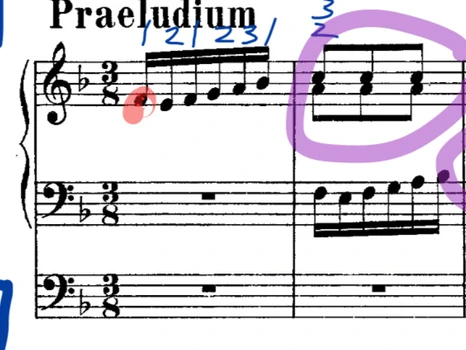 钢琴示范 · BWV 556 · 第 1–2 小节Piano sample · BWV 556 · Bars 1–2
当前未能播放媒体,可继续查看下方的操作截图。Media playback is unavailable. You can still explore the screenshots below.
谱面笔记On the score
把课堂上的提醒写进谱里Keep the lesson on the page
把常用的指法、分句和老师的示范,留在下次练习会看到的地方。Keep fingerings, phrasing marks and a teacher’s demonstration beside the passage you’ll play next.
圈出下次要重练的音
1 / 5用 Apple Pencil 或手指画分句、圈错音,用不同颜色区分指法和力度。下次打开谱,这些笔记还在原处。
练习工具While you play
练一句旋律,听清每个音Work through a phrase
让节拍器细分拍子,拉一个长音看音准,也可以放下谱,单独记录演奏。Subdivide a beat, check the pitch of a sustained note, or set the score aside and track a practice session.
在谱边给难点打拍子
1 / 4在读谱界面调速度、设重拍,把一拍分成两个、三个或四个音。比如三连音容易赶,就先用三连音细分把节奏练稳。
练习记录Practice history
上次练到哪一页?Where did you spend your practice time?
按日期找回一堂课,再打开具体曲目,看时间花在哪几页。Find a session by date, then open a score to see which pages took the most time.
点一个日期,找回当天的曲目
1 / 3翻到对应月份,点一天查看练过的曲目和页面。下一堂课前,可以按日期找回上次练习的内容。
协作与备份Sharing & backup
两台设备,同上一堂课Bring two devices to the lesson
面对面排练时一起看谱,课后把批注和声音妥善保存。Follow the same page in rehearsal and keep a copy of the markings and voice notes afterward.
老师翻页,学生同步看谱
1 / 2两台附近的设备先各自打开同一份原始 PDF,再通过本地 Wi-Fi 或蓝牙连接。按需分享批注、跟随页码与缩放,或同步节拍器设置。
上手前想知道的事Before you start
第一次使用,要准备什么?What do I need to get started?
准备一份自己的 PDF 乐谱,从“文件”或其他 App 导入 MusicFocus 就能开始。无需注册,也可以直接从练习界面开始计时。Bring a PDF of your own and import it from Files or another app. No account is required. You can also start from the practice screen and track a session without a score.
没有 Apple Pencil,能用手写指法吗?Can I mark fingerings without Apple Pencil?
可以,在 iPad 或 iPhone 上都能用手指写。独立指法笔会整理普通数字与圈数字;普通画笔会保留原来的笔迹。Apple Pencil 需搭配兼容的 iPad。Yes. Write with a finger on iPhone or iPad. The fingering pen standardizes plain and circled finger numbers. The regular pen keeps your handwriting. Apple Pencil requires a compatible iPad.
发给学生的 PDF 里有语音吗?Does the exported PDF include my voice notes?
标注 PDF 会带上可见的笔迹、指法和遮罩。要保留可播放的语音,请在 MusicFocus 中回听或使用整库备份。附近设备协作分享的是谱面标注、翻页和节拍器设置。The PDF carries visible ink, fingerings and covers. Playable voice notes stay in MusicFocus and are included in a library backup. Nearby collaboration shares score markings, page position and metronome settings.
练习检测会把整堂课录下来吗?Does practice detection record my whole lesson?
练习检测在设备上分析声音,只计时,不保存整段演奏录音。只有主动开始录制语音提醒,才会保存对应音频。Practice detection analyzes sound on your device to track playing time. It does not keep a recording of the session. Audio is saved when you explicitly record a voice note.
iPad 和 iPhone 怎样一起看同一份谱?How do I use an iPad and iPhone together?
在两台设备上分别导入同一份原始 PDF,让它们处在附近,然后打开设备连接面板。连接后可选择跟随谱面或交换批注,原始 PDF 需要事先分别准备。Import the same original PDF on both devices, keep them near each other, and open the connection panel. Once connected, choose whether to follow the page or exchange markings. Each device needs its own copy of the PDF.